Guides · Step by step
How to create a digital download
A digital download is the file a buyer gets after paying: usually a PDF, a JPG or PNG, or a ZIP of several files. To create one, make the product in your design app, export each file in the format and pixel size buyers need, give it a plain name, keep within your platform’s limits (on Etsy, 5 files of up to 20 MB), and check the files before you upload. Below, a real printable set goes from 382.2 MB of PNGs to five files Etsy accepts.
- Pick the file type
- Export at the right pixels
- Name the files
- Fit the size limit
- Package into five files
- Check, upload and test
1. Pick the file type for what you sell
Buyers should be able to open the file without special software. Etsy lists the types it accepts for digital files: .bmp .doc .gif .jpeg .jpg .mobi .mov .mp3 .mpeg .pdf .png .psp .rtf .stl .txt .zip .epub .ibook (Etsy Help). Anything else goes inside a ZIP.
| You sell | Give buyers | Why |
|---|---|---|
| Printable wall art | One JPG per print shape, at 300 pixels per inch | Prints sharp, and a JPG fits Etsy’s 20 MB where a PNG often doesn’t (step 4) |
| Planners, worksheets, ebooks | One file with a fixed layout that opens on any phone or computer | |
| Canva or other online templates | A PDF with the template link | The template lives in the other app; the PDF delivers the link and instructions |
| SVG cut files, fonts, brushes | ZIP | Etsy doesn’t list .svg, .otf, .ttf or .abr, but it takes .zip |
| Clip art with transparent backgrounds | PNG (in a ZIP if there are many) | JPG can’t keep transparency |
2. Export at the right pixels
Print shops ask for about 300 pixels per inch of paper, and printers go by pixels, not by the DPI number in the file (why). Export one file per print shape at the largest size you sell; the same file then prints every smaller size of that shape. Our example set uses one painting in five common shapes:
| Shape | Exported at | Pixels (300 DPI) | Also prints |
|---|---|---|---|
| 11×14 | 11×14 in | 3300×4200 | 11×14 in only |
| 4:5 | 16×20 in | 4800×6000 | 8×10, 16×20 in |
| 3:4 | 18×24 in | 5400×7200 | 6×8, 9×12, 12×16, 18×24 in |
| 2:3 | 24×36 in | 7200×10800 | 4×6, 8×12, 12×18, 16×24, 20×30, 24×36 in |
| ISO (A sizes) | A1 | 7016×9933 | A5, A4, A3, A2, A1 |
Test image: Vincent van Gogh, Wheat Field with Cypresses (The Met, public domain), cropped to each shape and enlarged from a 4000×3184 scan, saved as PNG at 300 DPI. A1 is 594×841 mm, so 7016×9933 px is the standard 300 DPI size.
3. Name the files
Etsy shows buyers the file name and you can’t rename a file after uploading it. Names may use up to 70 letters, numbers, periods, underscores and hyphens (Etsy Help). Our exports broke that rule on purpose, the way design apps often save them: Wheat Field 24x36 (2x3 ratio).png. Filepad suggests Wheat-Field-24x36-2x3-ratio.png, and the shrinker in the next step writes names like that for you. Say what is inside and the size, so a buyer with five downloads knows which to print.
4. Fit the size limit
We added the six files to Filepad’s checker with Etsy selected. It found 12 things to fix: six files where Etsy allows five, all five PNGs over 20 MB (30.3 MB, 55.8 MB, 70.0 MB, 117.1 MB, 109.1 MB), and six names that break Etsy’s rule.
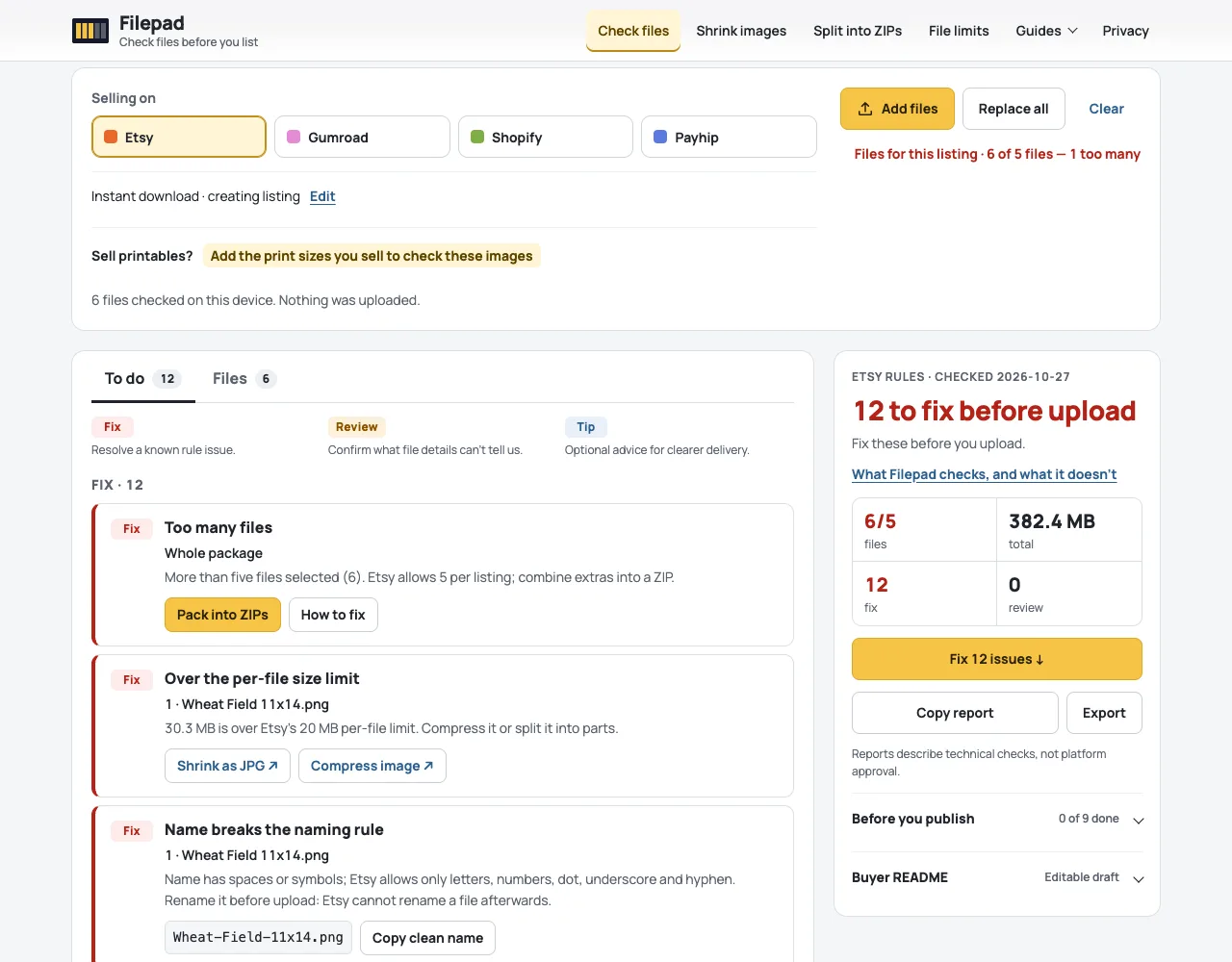
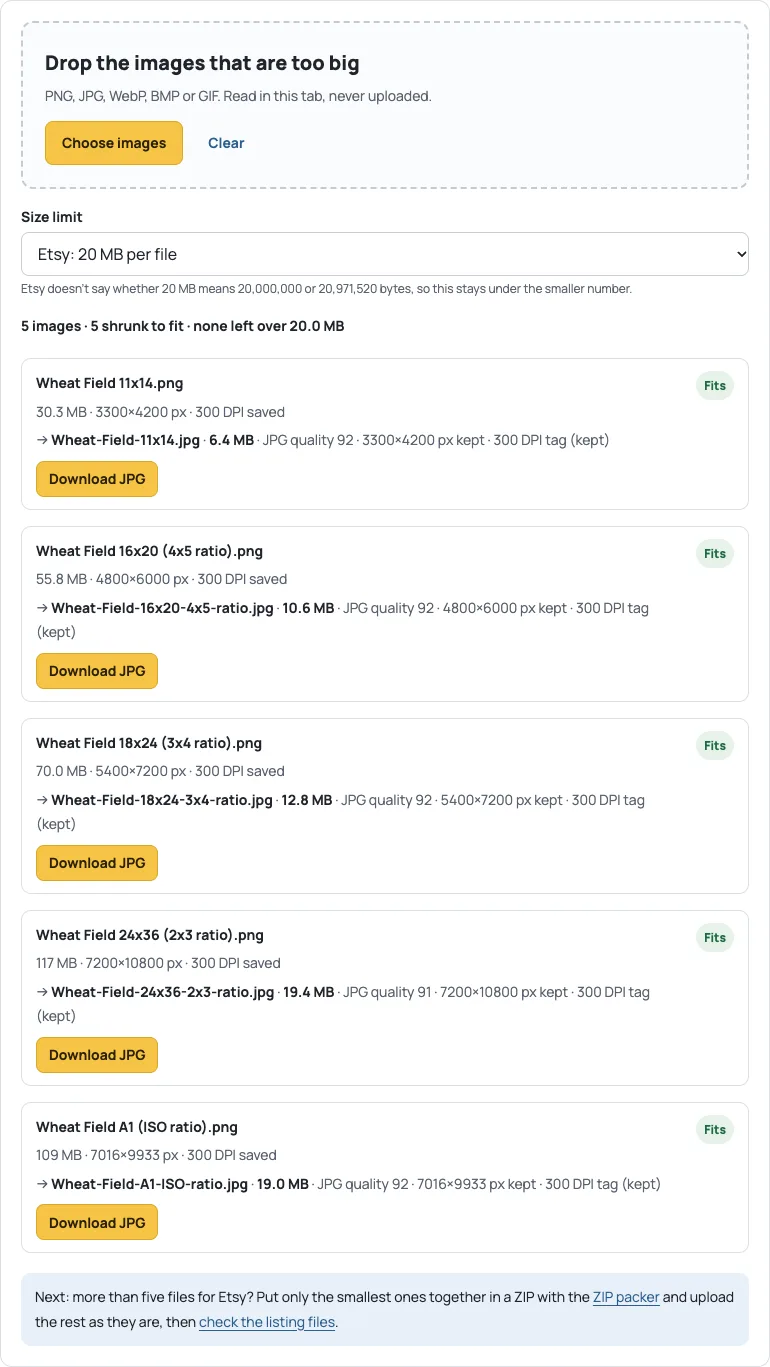
A ZIP can’t fix these sizes: PNG is already compressed, so zipping saves almost nothing. Saving each image as a high-quality JPG with the same pixels does. In the image shrinker all five PNGs took 8 seconds in Chrome on a Mac:
| File | PNG | JPG | JPG quality |
|---|---|---|---|
| Wheat-Field-11x14.jpg | 30.3 MB | 6.4 MB | 92 |
| Wheat-Field-16x20-4x5-ratio.jpg | 55.8 MB | 10.6 MB | 92 |
| Wheat-Field-18x24-3x4-ratio.jpg | 70.0 MB | 12.8 MB | 92 |
| Wheat-Field-24x36-2x3-ratio.jpg | 117.1 MB | 19.4 MB | 91 |
| Wheat-Field-A1-ISO-ratio.jpg | 109.1 MB | 19.0 MB | 92 |
From 382.2 MB to 68.2 MB with every pixel count unchanged. The 24×36 needed quality 91 to stay under 20,000,000 bytes; the others fitted at the starting quality of 92. Open each JPG at full size before you list it; detailed artwork can need a lower quality, and the shrinker says so if a file still won’t fit.
5. Package into five files
Five JPGs and the instructions PDF are still six files. Don’t zip everything: unzipping is an extra step for buyers, especially on a phone, and a print shop takes a JPG directly. Zip only what you must. The ZIP packer does that by default (Zip only what’s needed): with all six files added, it left the four largest JPGs to upload as they are and put the smallest JPG (11×14, 6.4 MB) and the PDF into one ZIP of 6.5 MB.
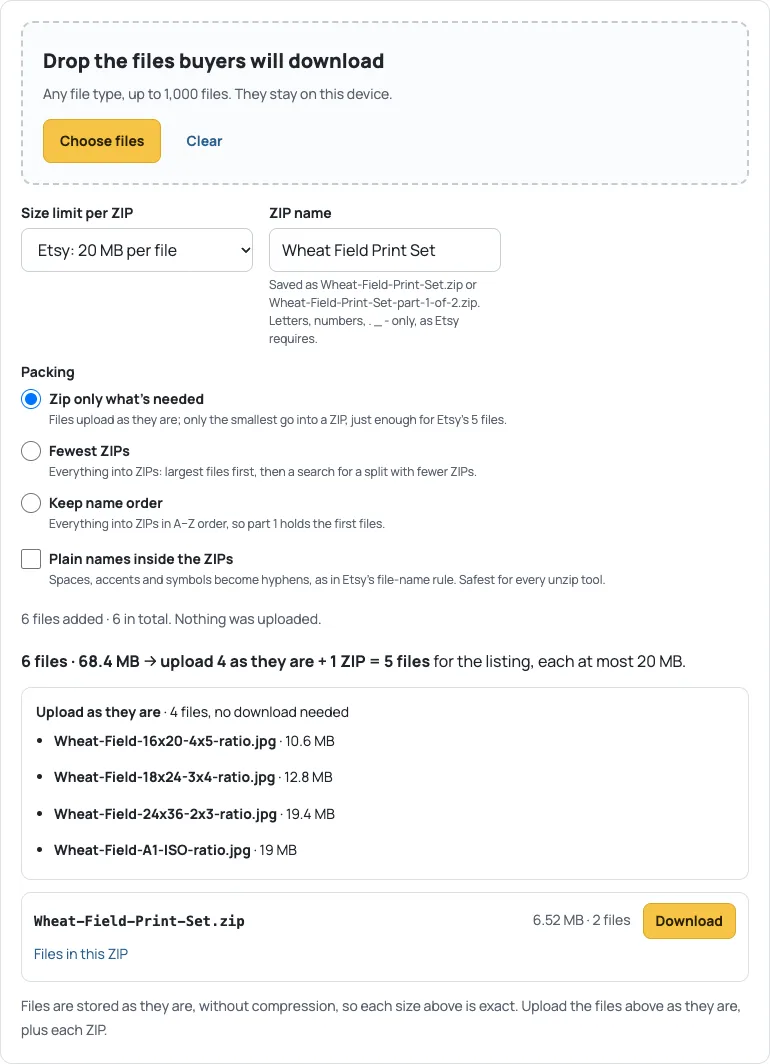
If you would rather send everything zipped, choose Fewest ZIPs. For this set that meant four ZIPs and no plain JPGs.
6. Check, upload and test
Run the final five files through the checker again before you upload. Ours came back with nothing to fix or review for Etsy:
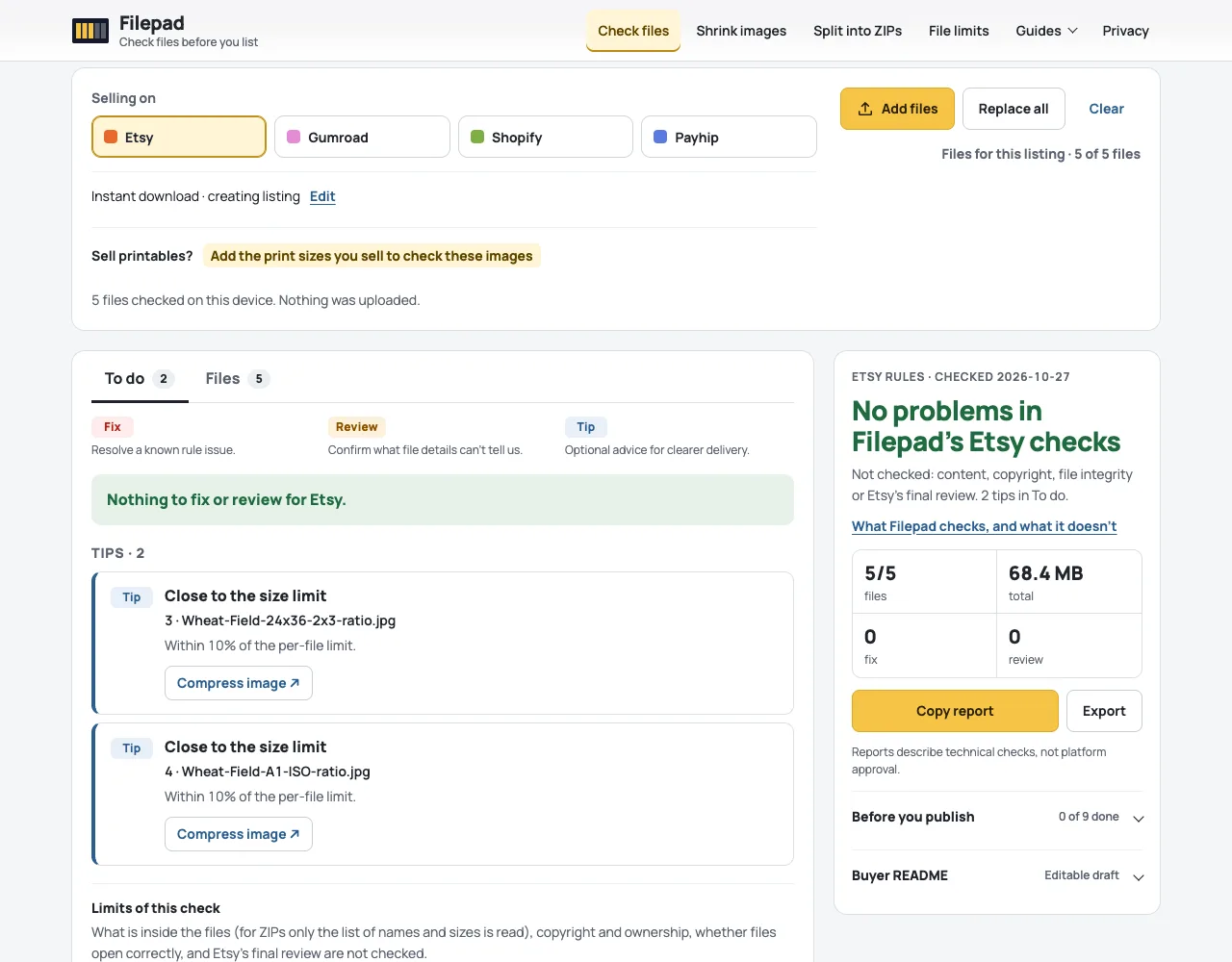
Two tips remain, and they are only tips: the 24×36 and A1 JPGs are within 10% of the 20 MB limit. They are under it, so they upload.
Before and after you upload:
- Open each of the five final files fully, on a phone and on a computer. A file check reads names, sizes and pixels; it doesn’t see whether the artwork itself is right.
- After you upload, compare the file names and sizes in the listing’s digital files with the ones you checked.
- Say in the description what each file is, for example “Wheat-Field-24x36-2x3-ratio.jpg: 2:3 shape, prints 4×6 to 24×36 in”.
Sources
- Etsy Help: How to Manage Your Digital Listings (5 files, 20 MB each, file types, file names); Filepad’s rules last checked against it on 27 October 2026.
- The Met: Wheat Field with Cypresses, public domain.
- All sizes in this guide come from running Filepad’s checker, shrinker and packer in Chrome on 14 November 2026. 1 MB = 1,000,000 bytes.
Next: Etsy file size limit · Printable DPI and print sizes · All platforms compared · All guides
Last updated: 14 November 2026